FG – BGP toggle

execute router clear bgp ip 203.0.113.241 soft

01_asd (aspath-list) # show
config router aspath-list
edit “AS-Azure”
config rule
edit 1
set action permit
set regexp “_12076$”
next
end
next
edit “AS-AWS”
config rule
edit 1
set action permit
set regexp “_9059$”
next
end
next
end

01_asd (aspath-list) # end

01_asd (CF) # config router route-map

01_asd (route-map) # show
config router route-map
edit “RM-To-VPN1”
config rule
edit 1
set match-ip-address “To_VPN1”
next
end
next
edit “RM-To-EIC”
config rule
edit 1
set action deny
set match-ip-address “RFC1918”
next
edit 2
set action deny
set match-ip-address “DEFAULT-GATEWAY”
next
edit 3
set match-as-path “AS-AWS”
set set-aspath-action replace
set set-aspath “9059”
next
edit 4
next
end
next
edit “RM-From-EIC”
config rule
edit 1
set match-as-path “AS-Azure”
set set-aspath-action replace
set set-aspath “12076”
next
end
next
edit “RM_From_EIC”
config rule
edit 1
set action deny
set match-ip-address “RFC1918”
next
edit 2
set action deny
set match-ip-address “DEFAULT-GATEWAY”
next
edit 3
next
end
next
end


4200064574

router bgp 64574
!
address-family ipv4 vrf ABC
neighbor 203.0.113.254 remote-as 4200064574

!
address-family ipv4 vrf ABC
neighbor 203.0.113.246 remote-as 4200064574

get router info bgp neighbors 203.0.113.241 advertised-routes

execute router clear bgp all soft (in/out)

clear bgp vrf 29595 ipv4 unicast 203.0.113.246

sh bgp vpnv4 unicast vrf ABC| inc 10.5
sh bgp vpnv4 unicast vrf ABC neighbors 203.0.113.246 advertised-routes

config router route-map
edit “EIC_Blue”
config rule
edit 1
set match-as-path “Azure”
set set-aspath “12076”
next
end
next
end

config router aspath-list
edit “From-Azure”
config rule
edit 1
set action permit
set regexp “_12076$”
next
end
next
end

config router route-map
edit “EIC_Blue”
config rule
edit 1
set match-as-path “Azure”
set set-aspath “12076”
next
end
next
end

onfig router route-map
edit “EIC-Blue”
config rule
edit 1
set match-as-path “From-Azure”
set set-aspath-action replace
set set-aspath “12076”
next
end
next
end

SRv6 – Eline

WIP

RP/0/RP0/CPU0:SR01a(config-evpn-ac-es)#l2vpn

RP/0/RP0/CPU0:SR01a(config-l2vpn)# bridge group bg-1500

RP/0/RP0/CPU0:SR01a(config-l2vpn-bg)#  bridge-domain bd-1500

RP/0/RP0/CPU0:SR01a(config-l2vpn-bg-bd)#   interface Bundle-Ether350.1500

RP/0/RP0/CPU0:SR01a(config-l2vpn-bg-bd-ac)#   !

RP/0/RP0/CPU0:SR01a(config-l2vpn-bg-bd-ac)#   routed interface BVI1500

RP/0/RP0/CPU0:SR01a(config-l2vpn-bg-bd-bvi)#   !

RP/0/RP0/CPU0:SR01a(config-l2vpn-bg-bd-bvi)#   evi 350

RP/0/RP0/CPU0:SR01a(config-l2vpn-bg-bd-evi)#   !

RP/0/RP0/CPU0:SR01a(config-l2vpn-bg-bd-evi)#  !

RP/0/RP0/CPU0:SR01a(config-l2vpn-bg-bd-evi)# !

RP/0/RP0/CPU0:SR01a(config-l2vpn-bg-bd-evi)#comm

Mon Oct  2 10:17:53.515 CEST

% Failed to commit one or more configuration items during a pseudo-atomic operation. All changes made have been reverted. Please issue ‘show configuration failed [inheritance]’ from this session to view the errors

RP/0/RP0/CPU0:SR01a(config-l2vpn-bg-bd-evi)#show configuration failed

Mon Oct  2 10:18:00.496 CEST

!! SEMANTIC ERRORS: This configuration was rejected by

!! the system due to semantic errors. The individual

!! errors with each failed configuration command can be

!! found below.

l2vpn

bridge group bg-1500

  bridge-domain bd-1500

   evi 350

!!% Operation not supported (Success): This EVPN instance id is already in use with other EVPN services

   !

  !

!

!

end

interface Bundle-Ether350

description “Bundle to FG1K2”

lacp period short

lacp system mac 0350.0002.8685

load-interval 30

!

int gigabitEthernet 0/0/0/33

bundle id 350 mode active

!

interface Bundle-Ether350.1500 l2transport

encapsulation dot1q 1500

rewrite ingress tag pop 1 symmetric

!

interface BVI 1500

       host-routing

       vrf A

       ipv4 address 10.20.30.1 255.255.255.0

       mac-address 700d.0350.1500

evpn

evi 350 segment-routing srv6

  !

!

interface Bundle-Ether350

  ethernet-segment

   identifier type 0 28.68.50.00.03.50.00.15.00

  !

!

l2vpn

bridge group bg-1500

  bridge-domain bd-1500

   interface Bundle-Ether350.1500

   !

   routed interface BVI1500

   !

   evi 350

   !

  !

!

IANA IPv6 Special-Purpose Address Registry


IANA IPv6 Special-Purpose Address Registry

Address Block  Name  RFC  Allocation Date  Termination Date  Source  Destination  Forwardable  Globally Reachable  Reserved-by-Protocol 
::1/128 Loopback Address [RFC4291] 2006-02 N/A False False False False True
::/128 Unspecified Address [RFC4291] 2006-02 N/A True False False False True
::ffff:0:0/96 IPv4-mapped Address [RFC4291] 2006-02 N/A False False False False True
64:ff9b::/96 IPv4-IPv6 Translat. [RFC6052] 2010-10 N/A True True True True False
64:ff9b:1::/48 IPv4-IPv6 Translat. [RFC8215] 2017-06 N/A True True True False False
100::/64 Discard-Only Address Block [RFC6666] 2012-06 N/A True True True False False
2001::/23 IETF Protocol Assignments [RFC2928] 2000-09 N/A False [1] False [1] False [1] False [1] False
2001::/32 TEREDO [RFC4380] [RFC8190] 2006-01 N/A True True True N/A [2] False
2001:1::1/128 Port Control Protocol Anycast [RFC7723] 2015-10 N/A True True True True False
2001:1::2/128 Traversal Using Relays around NAT Anycast [RFC8155] 2017-02 N/A True True True True False
2001:1::3/128 DNS-SD Service Registration Protocol Anycast Address [RFC-ietf-dnssd-srp-25] 2024-04 N/A True True True True False
2001:2::/48 Benchmarking [RFC5180][RFC Errata 1752] 2008-04 N/A True True True False False
2001:3::/32 AMT [RFC7450] 2014-12 N/A True True True True False
2001:4:112::/48 AS112-v6 [RFC7535] 2014-12 N/A True True True True False
2001:10::/28 Deprecated (previously ORCHID) [RFC4843] 2007-03 2014-03          
2001:20::/28 ORCHIDv2 [RFC7343] 2014-07 N/A True True True True False
2001:30::/28 Drone Remote ID Protocol Entity Tags (DETs) Prefix [RFC9374] 2022-12 N/A True True True True False
2001:db8::/32 Documentation [RFC3849] 2004-07 N/A False False False False False
2002::/16 [3] 6to4 [RFC3056] 2001-02 N/A True True True N/A [3] False
2620:4f:8000::/48 Direct Delegation AS112 Service [RFC7534] 2011-05 N/A True True True True False
3fff::/20 Documentation [RFC9637] 2024-07 N/A False False False False False
5f00::/16 Segment Routing (SRv6) SIDs [RFC-ietf-6man-sids-06] 2024-04 N/A True True True False False
fc00::/7 Unique-Local [RFC4193] [RFC8190] 2005-10 N/A True True True False [4] False
fe80::/10 Link-Local Unicast [RFC4291] 2006-02 N/A True True False False True

Footnotes

[1]
Unless allowed by a more specific allocation.
[2]
See Section 5 of [RFC4380] for details.
[3]
See [RFC3056] for details.
[4]
See [RFC4193] for more details on the routability of Unique-Local addresses.  The Unique-Local prefix is 
drawn from the IPv6 Global Unicast Address range, but is specified as not globally routed.

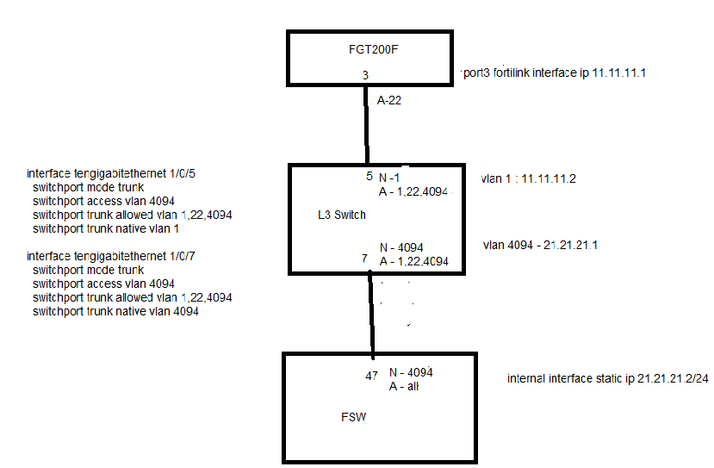
FortiLink mode over a layer-3 network


In some cases, the requirement is to bring up a FortiSwitch in FortiLink mode, but the FortiSwitch is not directly connected to the FortiGate.

There is a layer 3 network between FortiGate and FortiSwitch.


Read the below link before starting the configuration:

https://docs.fortinet.com/document/fortiswitch/7.2.4/fortilink-guide/801182/fortilink-mode-over-a-la…

https://docs.fortinet.com/document/fortiswitch/7.0.8/devices-managed-by-fortios/801182/fortilink-mod…


Note that the layer3 FortiLink config has changed from the 7.2.x version and above.


Refer to the below configuration:

FortiGate v7.2.4.

FortiSwitch v7.2.3.


sachitdas_FTNT_2-1685432383588.png

AAA – Tacacs+

AAA on IOS-XR (NCS540)

 
aaa authorization exec LOCAL local
aaa authorization exec TACACS group TACACS local

aaa authentication login LOCAL local
aaa authentication login TACACS group TACACS local

aaa accounting exec default start-stop group TACACS
aaa accounting system default start-stop group TACACS
aaa accounting commands default start-stop group TACACS

aaa group server tacacs+ TACACS
 server 10.0.0.1
 server 10.0.0.2

tacacs-server host 10.0.0.1 port 49
 key 7 xxx
!
tacacs-server host 10.0.0.2 port 49
 key 7 xxx
!
username admin
 group root-lr
 secret 10 xxx

line console
 authorization exec LOCAL
 login authentication LOCAL
 exec-timeout 12 0
!
line default
 authorization exec TACACS
 login authentication TACACS
 exec-timeout 12 0
 transport input ssh

Central Services Topology

> Question:  Have also seen comments in foreeum like. The best practice for this Hub and Spoke is to use TWO VRF in Hub site – “From-Spoke” and “To-Spoke”


This is immaterial implementation detail. Some shops do this, because their automation system abstracts VRF into set of import/export statements and clients share set and hubs share different set. Also if you have hub and spoke in the same PE, you’re going to need another name, if not, single name is fine, but may be more difficult to automate as name does not imply config.


ipv4 vrf hubs

  route-target export 42:hubs

  route-target import 42:spokes

ipv4 vrf spokes

  route-target export 42:spokes

  route-target import 42:hubs


Now the problem with this approach is that if you have >1 spokes in the same PE, they are able to communicate to each other. To workaround this, you’ll need ‘half duplex VRF’, where ingress and egress RIB/FIB are different.

Packets coming from spokes look at FibA, packets going to spokes look at FibB. FibA has only route to hubs, FibA has only routes to spokes.


ip vrf spokesIn

  route-target import 42:hubs

ip vrf spokesOut

  route-target export 42:spokes

ip vrf hubs

   route-target export 42:hubs

   route-target import 42:spokes


PE1:

int Spoke1

  ip vrf forwarding spokesIn downstream spokesOut int Spoke2

  ip vrf forwarding spokesIn downstream spokesOut int Hub1

  ip vrf hubs

int Hub2

  ip vrf hubs


Fortigate FGSP

https://kb.fortinet.com/kb/microsites/search.do?cmd=displayKC&docType=kc&externalId=FD46111&sliceId=1&docTypeID=DT_KCARTICLE_1_1&dialogID=164542366&stateId=0%200%20164540878%27

https://kb.fortinet.com/kb/microsites/search.do?cmd=displayKC&docType=kc&externalId=FD46242&sliceId=1&docTypeID=DT_KCARTICLE_1_1&dialogID=164542366&stateId=0%200%20164540878%27

1 2 3 4 22